
Mela 7.1 Update: Introducing Collection 5, Frequency Shifter, Limiter, and New Modulation Tools
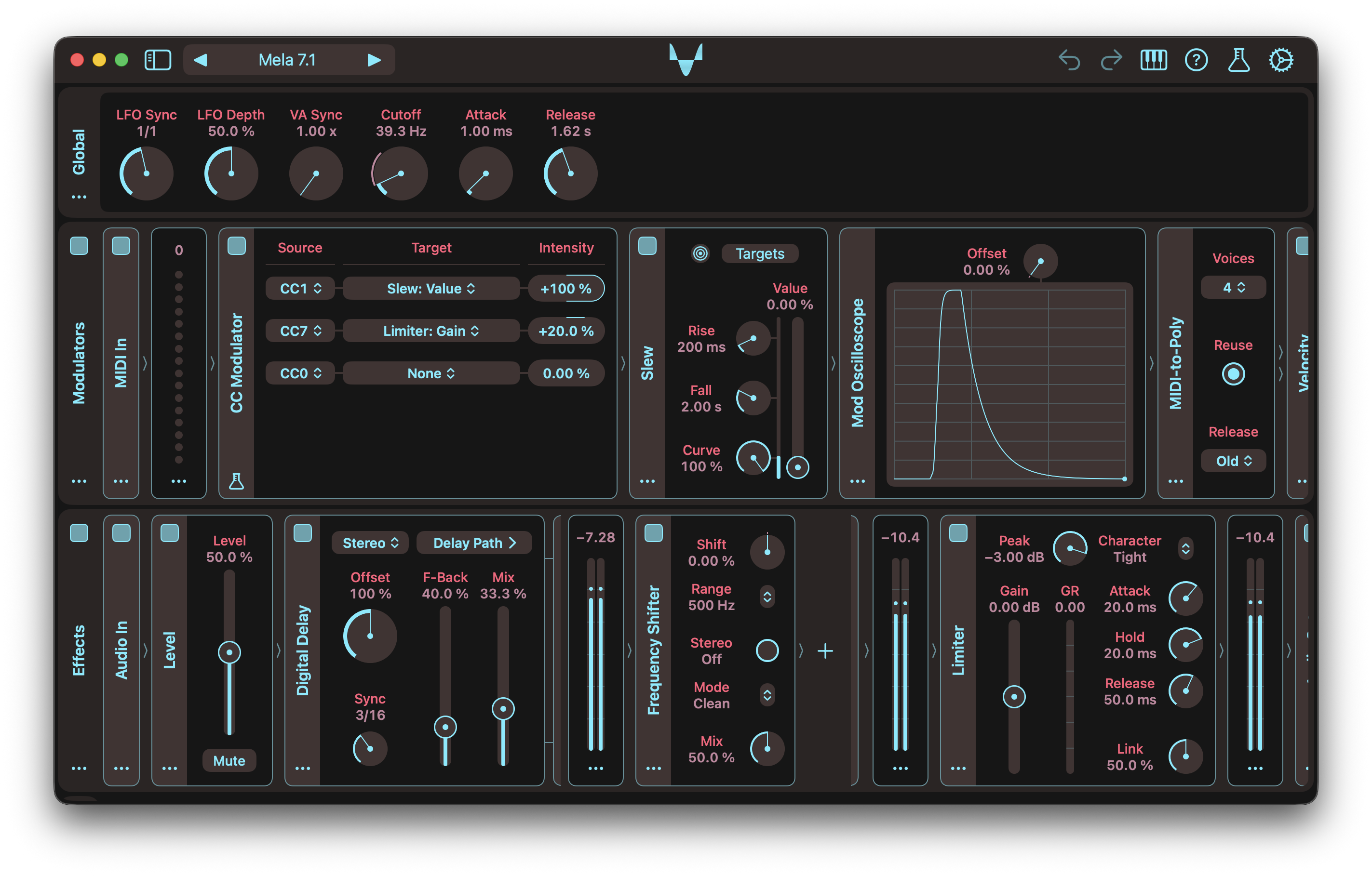
Mela 7.1 introduces Collection 5, a new set of creative and essential modules. It begins with one of the most requested audio processors, Frequency Shifter, a highly configurable module for producing metallic and inharmonic textures. Also included is a transparent brickwall Limiter, designed to be an essential part of your production toolkit.
Collection 5 also brings powerful new modulation tools: CC Modulator, Slew, and Mod Oscilloscope. Unlike other modulators in Mela, CC Modulator allows each target parameter to use a different MIDI CC source. This provides an alternative way to automate parameters from the host, especially in hosts that do not support AUv3 dynamic parameter trees. The host can send MIDI CC automation curves, which are translated into parameter modulation.
Slew smooths Mod signals using independent Rise and Fall controls, with support for linear, exponential, or blended curves. Mod Oscilloscope lets you visualise Mod signals in real time by modulating its Offset parameter.
Beyond Collection 5, version 7.1 adds the new MIDI Meter module to Collection 0 for visualising MIDI messages. The existing Meter module has been refined with a more compact design. The Arpeggiator now includes an indicator that shows the active note position within the chord, along with a new Manual mode for creating custom patterns by modulating the Position parameter.
Collection 5 will continue to expand with every 7.x update and is available as a one-time purchase.
There’s a lot more in this update. For the full details, check out the Changelog.
Latest Tutorials
The Mela 7.1 update introduces Collection 5, featuring creative and essential audio modules such as Frequency Shifter for metallic and inharmonic textures, a transparent brickwall Limiter, plus new modulation tools including Slew, CC Modulator, and Mod Oscilloscope.
Learn how to create rich unison sounds in Mela by stacking oscillators quickly and easily.
Version 7.1 introduced new Arpeggiator features, including an indicator that visualises the active pattern and a new Manual mode. Manual mode lets you create custom arpeggio patterns by automating or modulating the Position parameter.
In this video, I showcase Slew and Mod Oscilloscope. Slew smooths Mod signals, while Mod Oscilloscope visualises them.
In this video, I introduce the Frequency Shifter module, which is great for creating metallic and inharmonic textures.
Mela 7.1 Changelog
Frequency Shifter
- Frequency Shifter offsets all frequency components in the Audio signal by a fixed amount, producing metallic or inharmonic textures unlike pitch shifting.
- Provides useful tweaks with parameters: Shift, Range, Mode, Stereo, Mix.
- Shift: Sets the shift amount within the selected Range. Linear ranges map directly, while Cubic uses a non-linear curve for finer control near 0.
- Range: Selects the maximum shift amount. Linear ranges map -100% to 100% directly. Cubic is non-linear and spans +/- 5 kHz.
- Mode: Selects how energy behaves around 0 Hz. Clean is single-sideband. Reflect preserves down-shifted components below 0 Hz. Duplicate adds mirrored components when shifting up. Both combines reflect and duplicate.
- Stereo: When enabled, left and right channels shift in opposite directions.
Limiter
- Limiter is a brickwall limiter that provides transparent peak control using a lookahead gain envelope.
- Includes standard controls such as input gain, attack, release, and channel linking, along with a gain reduction meter.
- Offers character modes for either faster response or smoother, lower-distortion limiting.
Slew
- Slew is a modulator that smoothly ramps the Mod signal toward a target value.
- The target is set by the Value parameter and can itself be modulated to smooth another Mod signal.
- Ramping can be linear, exponential, or a blend of both, controlled by the Curve parameter.
- The Rise and Fall parameters determine how quickly the Mod signal responds when the Value parameter changes.
- The indicator lets you visualise the current value of the Mod signal.
CC Modulator
- CC Modulator uses incoming MIDI CC messages to modulate parameters.
- Unlike other modulators, each target can be configured to use a different MIDI CC source.
- This provides an alternative way to automate parameters from the host.
- The host can send MIDI CC automation curves, which are translated into parameter modulation.
- CC Modulator is a Mela Lab module.
Mod Oscilloscope
- Mod Oscilloscope visualises the modulated value of its Offset parameter.
- Modulating Offset at 100% intensity displays the modulator’s Mod signal directly.
- For best results, set Offset to 0% for unipolar Mod signals and to 50% for bipolar signals.
- The module can also be used to visualise how another parameter is being modulated.
- To do so, apply the same modulation settings to Offset as the target parameter.
MIDI Meter
- Added the MIDI Meter module for visualising incoming MIDI values.
- Displays a 16-circle vertical meter and a numeric value readout.
- MIDI Meter is part of Collection 0 and listed under the Visualiser category.
Arpeggiator
- Added an indicator that visualises the active note position within the chord.
- Added Manual mode, where the new Position parameter selects the next chord position across the active Oct Range.
- The Position parameter is a great target for automation or modulation, enabling custom arpeggio patterns.
Other Changes
- Meter: The module now has a more minimalistic appearance with no sidebar, as there is little benefit to keeping it collapsed or showing its name.
- Meter: Updated the DSP implementation for a more natural response.
- Band Pass: Now supports Poly mode and no longer collapses Poly signal to Mono.
- Module Actions Menu: The menu now displays the module name as the title. If the type is not clear from the name, the type name is appended in brackets.
- Modulators: Refined the appearance of the modulators’ drag target icon.
- Module Categories: Replaced the Utility module category with Visualiser.
- Pitch Ramp: The module has graduated from Mela Lab and can now be found under the Pitch Processor category.
- Presets: Updated the default preset to use MIDI Meter.
- Automation: Fixed a 7.0 regression that prevented parameter automation from working in some hosts.
- Note Stack: The module now ensures that generated note-off events precede note-on events within the same sample call.
I release updates regularly, guided by user feedback and Mela’s long-term vision. Along with the User Guide, you might find the Tutorials, Changelog, and FAQ helpful. For bug reports or feature requests, visit Mela Feedback. Feel free to get in touch anytime.
Grab Mela from the App Store.