
Mela 8.0: Adaptive iPhone Layout and Easier Patch Navigation
It’s that time of year again: I’m bumping Mela’s major version. The main reason is that I’m dropping support for iOS 18 and macOS 15. Mela 8.0 now requires iOS or iPadOS 26 or later, or macOS 26 or later on an Apple Silicon Mac. If you’ve downloaded Mela before, the App Store can offer the last version compatible with your device. I have no near-term plans for a new module collection and will keep improving and expanding the existing ones.
Mela 8.0 focuses on workflow and navigation, especially on smaller screens. The standalone iPhone layout makes better use of the screen by following its rounded corners and keeping controls clear of camera cutouts. It adapts to iPhone Duo whether folded or unfolded. For the best experience, use iOS 27.1 or later.
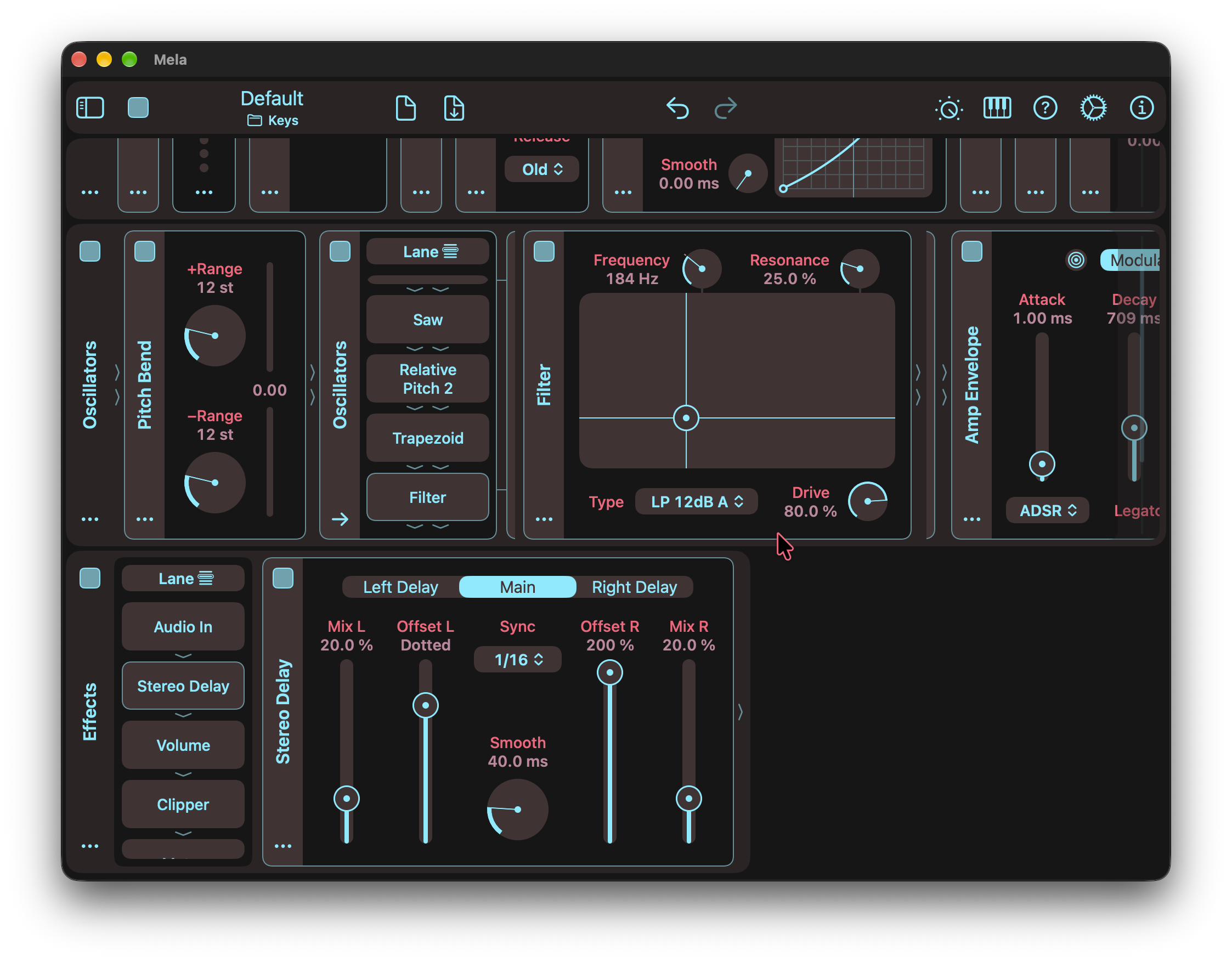
Module Selector, familiar from Stack and other container modules, is now an option for Lane and MIDI Lane, including top-level lanes. The inline layout remains the default, and you can now drag modules into and out of the selector to rearrange your patch.
Module and lane sidebar titles, Module Selector items, and the patch title now have context menus. Long-press or secondary-click to open their actions directly.
Finally, Mela users have long asked for a way to scroll lanes on iOS without accidentally changing parameters. The new translucent control on a lane’s right edge becomes more visible on touch or hover. Drag it up or down to scroll the lane horizontally. To scroll the patch vertically on iOS, swipe up or down on a lane’s left sidebar.
For the full details, check out the Changelog.
Latest Tutorial
In this video, I highlight some of what’s new in Mela 8.0. The update brings an improved iPhone layout, including full support for iPhone Duo. The new Module Selector for Lane modules provides a familiar, compact interface for navigating modules in a Lane. Finally, the new context menus and lane scrolling controls make the interface easier to navigate, especially on smaller devices.
Mela 8.0 Changelog
Adaptive Layout on iOS
- Improved the standalone iPhone layout, including iPhone Duo when folded or unfolded.
- Maximises screen space with a layout that follows the device’s rounded corners, while ensuring camera cutouts don’t prevent access to controls.
- For the best experience, use iOS 27.1 or later.
Module Selector
- Lane and MIDI Lane modules, including top-level lanes, now offer a Module Selector toggle in their actions menus.
- Module Selector adds a vertically scrolling list of submodules, with arrows showing their serial signal flow.
- It uses the same interface as Stack and other container modules.
- The existing inline layout remains the default for the Lane module.
- Submodules can now be dragged from Module Selector and dropped anywhere modules can be moved.
- A module can be dropped into Module Selector to insert it.
- A submodule selected in Module Selector or Matrix now always appears expanded.
- Tapping its sidebar clears the selection and preserves its saved expand/collapse state.
Context Menus
- Module and lane sidebar titles, Module Selector items and the patch title now offer context menus with their actions.
- Open a menu with a long press on touch devices or a secondary click with a mouse or trackpad. This can be quicker than using the actions button.
- The patch title’s menu includes patch actions, Save/Export and Remotes, making them easier to reach on smaller devices or in narrow AUv3 windows.
- When those toolbar buttons are hidden, their actions remain in the patch title’s menu instead of moving into overflow. This keeps the toolbar overflow menu simpler to navigate.
Lane Scrolling
- Lanes now show a translucent scroll control along the right edge that becomes more visible on touch or hover.
- Drag up or down to scroll the lane horizontally, or tap/click the track to jump to a position.
- This allows quick lane scrolling without worrying about accidentally changing parameter values, especially on iOS.
- On iOS, swiping up or down on a lane’s left sidebar remains the recommended way to scroll the patch vertically.
- Removed system scroll indicators to reduce visual clutter.
Patch Saving
- Added “Always Discard” to the discard changes dialog for quicker patch auditioning.
- It skips further discard confirmations for the session.
- Saving a patch enables them again.
- The save icon now appears filled for unmodified factory patches as well as user patches, consistently indicating whether there are unsaved changes.
Other Changes
- Mela now requires iOS/iPadOS 26 or macOS 26 or later. The Mac version requires Apple Silicon.
- Lane Layout: Top-level lane backgrounds now fit their content.
- Fixed MIDI Echo missing from the Nest menu and enabled its Unnest action.
- Parameter Controls: Improved the reliability of double- and triple-tap/click gestures.
Grab Mela from the App Store.