
Mela 7.9: Reinforcing the "Everything is a Module" philosophy
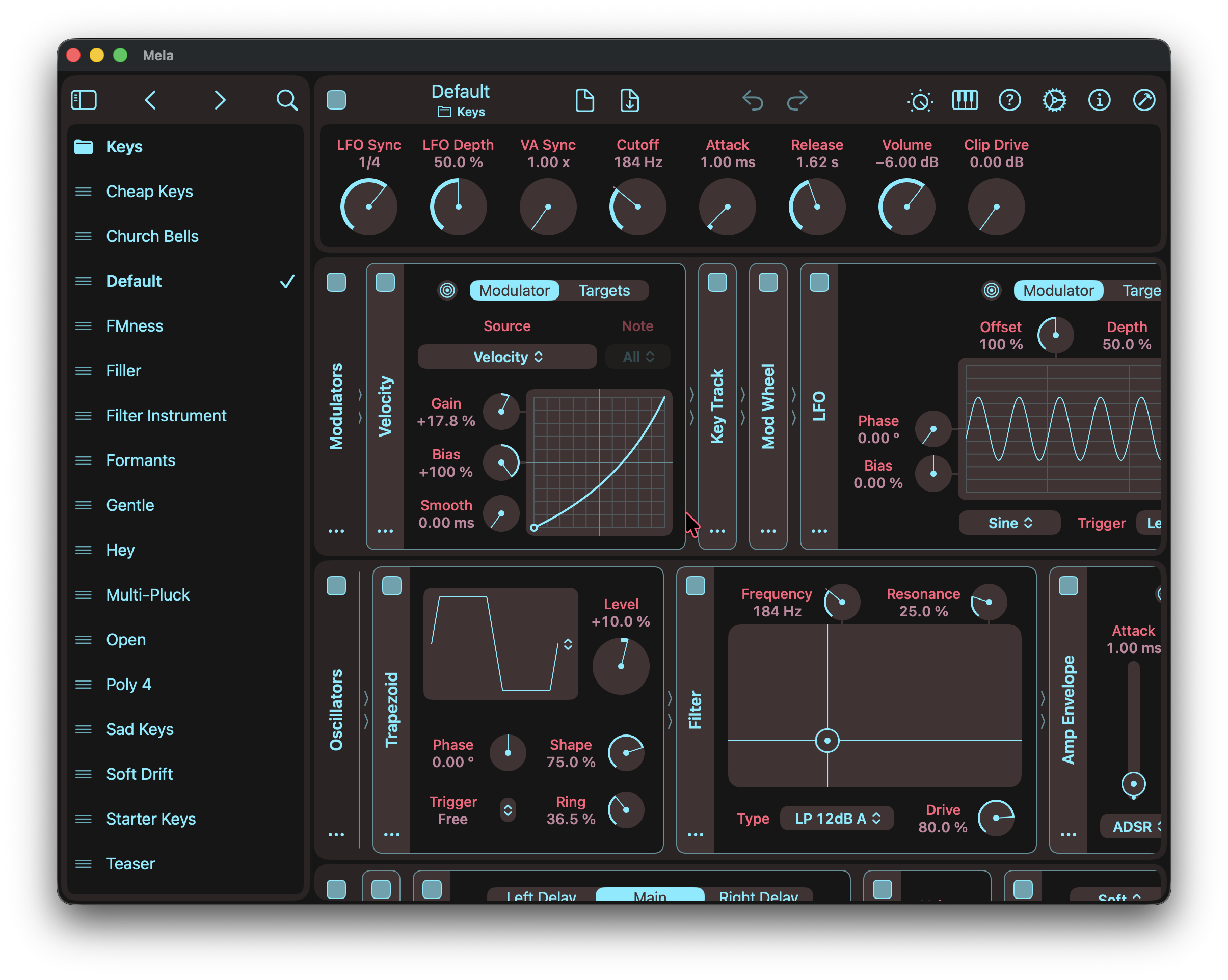
Mela 7.9 focuses on simplifying patch management and reinforcing Mela’s “everything is a module” philosophy. As Mela has evolved, Presets, Preset Groups, and the Preset Browser have become better described as Patches, Folders, and the Library. The toolbar, preset selector, and Global view have also been unified into a single design, making it clearer that a patch is simply the root module and everything contained within it.
The root module is now presented as a header that combines the On parameter, naming, save state, patch actions, and remotes view. The patch can be renamed directly, dragged out to export, and managed using Init, Copy, Paste, Revert, and Delete actions. The Library has also been refreshed around the new terminology. New plug-in instances now start with a blank patch, while the previous default patches are found in the Keys, Audio FX, and MIDI FX folders.
For the full details, check out the Changelog.
Latest Tutorial
This video highlights the latest changes in Mela 7.9, including the unified root module header, refreshed Library workflow, patch actions, and the shift from presets and preset groups to patches and folders.
Mela 7.9 Changelog
This update focuses on simplifying patch management and reinforcing Mela’s “everything is a module” philosophy. As Mela has evolved, Presets, Preset Groups, and the Preset Browser have become better described as Patches, Folders, and the Library. The toolbar, preset selector, and Global view have also been unified into a single design, making it clearer that a patch is simply the root module and everything contained within it.
Root Module
- The root module sidebar is now presented as a header.
- The header combines the functionality previously spread across the toolbar, preset selector, and Global view.
- Root module remotes now collapse into the header when the patch is scrolled.
- Tapping the patch name, which is also the root module name, now turns it into an editable text field for renaming.
- The patch name can now be dragged and dropped to another instance, the Library, or Files/Finder to export the active patch.
- The root module, or active patch, now offers Init, Copy, Paste, Revert, and Delete actions.
- Init removes all lanes and initialises the patch name to “Untitled”.
- Copy copies the root module as a patch to the clipboard.
- Paste replaces the root module with a patch from the clipboard.
- Revert discards changes made to the active patch by restoring its original state.
- Delete removes the patch from the Library.
- The Save Patch button now provides single-action save behaviour.
- Long pressing the Save Patch button presents additional actions such as “Save to” and “Export”.
- The filled save icon indicates that there are no unsaved changes.
- The folder containing the active patch is now displayed below the patch name.
- If the active patch is not linked to a file in the Library, “Detached” is displayed below the patch name.
- Renaming the active patch unlinks it from the Library, allowing it to be saved under a new name.
- Mela now automatically relinks restored host states to their corresponding Library patches and indicates whether unsaved changes exist.
- Toolbar buttons move into an overflow menu when there is insufficient width.
- The file menu has been updated to match the root module actions.
- Replaced the preset selector help text with a new “Patches” section in the Getting Started guide.
Library and Patches
- The Library UI has been refreshed to complement the new root module design.
- Its toolbar includes buttons for selecting the previous and next patch.
- Mela plug-in no longer loads the Default patch when instantiated.
- New instances now start with a blank patch, and the Library scrolled to the relevant folder.
- The previous Default patch can be found in the Keys, Audio FX, and MIDI FX folders.
- Deleting an empty folder no longer requires confirmation.
- Renamed the Parts folder to Subpatches.
Other Changes
- Library and toolbar buttons once again scale with the zoom setting.
- Improved the layout of actions in module menus.
- Patch and module names can no longer contain filename-unsafe characters.
Grab Mela from the App Store.